Observations by Subaru Telescope are performed through script files called 'OPE file (Observation Procedure Execute file; often called OPEration file, though)'.
Observers (you) are requested to prepare for the OPE file describing the sequence of your observing tasks prior to your observation. The OPE file consists of information on your targets and individual operating commands for the target acquisition, exposing, focusing, filter change and so on. Please prepare for your OPE files and send them to Support Astronomer (SA) by e-mail. On the observing night, telescope operators will load your OPE file onto the observation control system and perform the observation following your requests by executing the operating commands that you provided.
Individual commands are executed by telescope operators with a line-by-line basis. Since telescope operators can choose any command line to execute in your OPE file and you may also edit and modify the OPE file on site while you are observing, the command lines do not have to be sorted exactly in the order of your observing plan. However, if you write down the command lines in a sorted order with reasonable comment lines, it would be helpful for night operators to understand your intent correctly and to prevent misoperation.
You may include all the targets in one OPE file. However, it would be a good idea to separate your OPE file into reasonably small files especially by each night if you are awarded two or more nights and have a lot of targets with multiple filters to observe.
Please refer to instruction pages by visiting hyperlinks below for how to upload the OPE file
onto the obsevation control system.
[Summit Observation]
[Remote Observation].
To see is to believe [a template ope file with instructions]
The OPE file is composed of three parts:
Example:
    Alloc $DEF_SPCAM


Description:
  This command is to establish the connection between Suprime-Cam data
  aquisition system and the observing system (SOSs).

Parameters and default values:
 * Alloc accepts no parameter.


Notes:
 - This command is usually completed by operators.
 - You need to execute this command only once at the beginning of your
   observation. If you fail to complete this command, any data
   obtained in your time may be transferred to an unexpected data area with
   a wrong permission.
Example:
    GetBIAS $DEF_SPCAM
    GetDARK $DEF_SPCAM EXPTIME=600


Description:
  These commands are used to take bias or dark frames

Parameters and default values:
 * GetBIAS accepts no parameter.
 * GetDARK
  EXPTIME=1       : Exposure time for a dark frame (sec)

Notes:
 - Bias frames should be obtained with any filter set in at the focal
   position, as no filter would cause stray light through the gap
   between the shutter and the dewar window.
 - If you need bias frames for reduction, you should take the bias
   when the outside is enough dark.
 - Bias level is variable through the night and overscan regions are
   usually used to estimate the bias level for each of data frames.
 - Usually, we do not take dark frames since CCD tempearture of
   Suprime-Cam is very stable at around -110 degree C and dark current
   is negligible.
Example:
  SetupField $DEF_IMAGE $SA92 OFFSET_RA=0 OFFSET_DEC=0 FILTER="W-C-RC"
  GetStandard $DEF_IMAGE $SA92 EXPTIME=5 DELTA_Z=0.4 OFFSET_RA=0 OFFSET_DEC=0 FILTER="W-C-RC"


Description:
  These commands are used to take a standard star field.

  - SetupField moves the telescope pointing to the specified coordinates
    with a specified Insrot_PA.  OFFSET_RA (arcsec) and OFFSET_DEC (arcsec) are
    added to the RA and Dec of the target field, then the
    telescope will be pointed to the calculated coordinates.
  - GetStandard command, first, changes the telescope focus by DELTA_Z (mm)
    (=defocusing) from the current position, and then makes one exposure with
    EXPTIME (sec) at the position where the telescope is pointing. After the
    exposure is done, the telescope focus is set back to the original position.

    GetStandard never changes the telescope pointing. OFFSET_RA and OFFSET_DEC
    in GetStandard shown in the above example are only for consistency with other
    modes (in other words, they are never used upon execution).
    Parameters and default values:

  Defocusing
    In general, popular standard stars (such as Landolt's stars or typical
    spectrophotometric stars) are, generally, too bright for
    on-focus imaging with Suprime-Cam to obtain reasonable photon counts in the
    linearity range even with a shortest exptime. Therfore, we
    usually have to make a defocusing when taking standard stars.

    Typically, reasonable defocusing on the order of 0.2 - 0.4mm
    is needed for 12-13 mag stars for exptime= 2 - 5 sec, and any
    stars brigher than 11 mag would be unavailable.

    Typical coordinates and exposure time configuration for standard
    stars - under preparation.

  Spectrophotometric Stars
    Many of users take spectrophotometric standard stars to
    calibrate data with filters other than Johnson/Cousins' filters
    - narrow or intermediate band filters, custom-made filters, and
      SDSS's filters (g',r',i',z')
    Since those spectrophotometric standards are usually single objects, Offset_RA
    or Offset_Dec is used to get the star fallen on a CCD depending
    on the Insrot_PA so that one can perform aperture photometry on it.

  ex:
    SetupField $DEF_IMAGE $Feige34 OFFSET_RA=0 OFFSET_DEC=30 FILTER="W-S-I+"
    GetStandard $DEF_IMAGE $Feige34 EXPTIME=5 DELTA_Z=0.4 OFFSET_RA=0 OFFSET_DEC=30 FILTER="W-S-I+"

Parameters and default values:

 * SetupField
  FILTER=NOP      : You must specify one filter code name.
  RA, DEC, Insrot_PA : Current values
  OFFSET_DEC=0    : Offset to be added to Dec of the target (arcsec)
  OFFSET_RA=0     : Offset to be added to RA of the target (arcsec)

 * GetStandard
  EXPTIME=10      : Exposure time (sec)
  FILTER=NOP      : You must specify one filter code name.
  RA, DEC, Insrot_PA : Current values
  OFFSET_DEC=0    : Offset to be added to Dec of the target (arcsec)
  OFFSET_RA=0     : Offset to be added to RA of the target (arcsec)

Notes:
Example:
  SetupSkyflat $DEF_IMAGE FILTER="W-C-RC"
  GetSkyflat $DEF_IMAGE EXPTIME=2 FILTER="W-C-RC"


Description:
  These commands are used to take skyflat frames on the twilight sky.
  (*) Usually, you do not need to include this commands in your ope
  file because we mostly take the twilight flat by using the Launcher
  buttons which are located in the observation control system GUI.
  So, this section is intended to describe what processes would be
  done in the twilight flat acquisition.

  - SetupSkyflat moves the telescope to (EL=85, AZ=current AZ) and
    starts open sidereal tracking at the position.
  - GetSkyflat command takes one exposure with EXPTIME (sec) at
    the position where the telescope is pointing.

Parameters and default values:

 * SetupSkyflat
  FILTER=NOP      : You must specify one filter code name.
  Insrot_PA       : Current value

 * GetSkyflat
  EXPTIME=10      : Exposure time (sec)
  FILTER=NOP      : You must specify one filter code name.

Notes:
   - SetupSkyflat should be executed everytime after GetSkyflat is done.
     This procedure is for the purpose of taking different shots at
     different pointings by adding enough large offsets.

   - Telescope is tracking with a sidereal rate during twilight flats.

   - Operators would try to keep counts of 12000 ADU per pixel in each frame.
     If you have any special request for twilight flats, please ask operators.

   - Since filter change takes more than 3 min to be finished, taking
     flats in the same twilight time with 2 or more filters is so
     much inefficient and not recommended.
Example:
  SetupDomeFlat $DEF_CMNTOOL SETUP=SETUP  LAMP=4X10W VOLT=3.00 AMP=4.36

  GetDomeFlat $DEF_IMAGE EXPTIME=15 Filter="W-C-RC"
  GetDomeFlat $DEF_IMAGE EXPTIME=15 Filter="W-C-RC"
  GetDomeFlat $DEF_IMAGE EXPTIME=15 Filter="W-C-RC"

  ShutdownDomeFlat $DEF_CMNTOOL


Description:
  These commands are used to take dome flat frames.

  - SetupDomeFlat configures the instrument and the telescope
    for the domeflat, including dome lamp settings and a
    position of the AG probe etc.

    Usually, LAMP=4X10W is used for dome lamps for Suprime-Cam.

    If the parameter SETUP=SETUP is set, SetupDomeFlat will powercycle
    the dome lamps and change voltages and currents for the
    lamps to requested values.

    If the parameter SETUP=CHANGE is set, SetupDomeFlat does not turn on
    the lamps and just tries to change voltages and currents.

    Operators can turn on/off the lamps and change the voltages and
    currents from the telescope control system.

  - GetDomeFlat command takes one exposure with EXPTIME (sec) in the
    band of FILTER.

  - You need to take domeflats with the top screens of the dome at
   appropriate positions. Please ask operators for domeflats.

  - If you have any special request during the domeflat,  please ask
    operators.

  - ShutdownDomeFlat turns off the lamps.

Parameters and default values:

 * SetupSkyflat
  FILTER=NOP      : You must specify one filter code name.

 * GetObject
  EXPTIME=10      : Exposure time (sec)
  FILTER=NOP      : You must specify one filter code name.

Dome Flat Configurations:

  Typical combinations of appropriate dome lamp settings and exposure
  times are as follows:
  (VOLT, AMP, EXPTIME)
  (6.00, 6.33, 10) for B,  (4.00, 5.10, 15) for V
  (3.00, 4.36, 15) for Rc, (2.70, 4.15, 10) for Ic
  (5.00, 5.72, 10) for g+, (3.00, 4.34, 15) for r+
  (2.70, 4.11, 10) for i+, (2.67, 4.08, 10) for z+

  For other filters, information can be found in the hyperlink below.
Notes:
    You should check the first image to ensure the count obtained is fine.
Example:
1. With OpenTracking
  SetupField $DEF_IMAGE $SXDF OFFSET_RA=0 OFFSET_DEC=0 FILTER="W-C-RC"
  GetObject $DEF_IMAGE $SXDF EXPTIME=480 OFFSET_RA=0 OFFSET_DEC=0 FILTER="W-C-RC"

2. With AutoGuiding
  SetupField $DEF_IMAGE_VGW $SXDF OFFSET_RA=0 OFFSET_DEC=0 FILTER="W-C-RC"
  GetObject $DEF_IMAGE_VGW $SXDF EXPTIME=480 OFFSET_RA=0 OFFSET_DEC=0 FILTER="W-C-RC"


Description:
  These commands are used to take 1-shot exposure at a specified field.

  - SetupField moves the telescope pointing to the specified coordinates
    with a specified Insrot_PA.  OFFSET_RA (arcsec) and OFFSET_DEC (arcsec) are
    added to the RA and Dec of the target field, then the
    telescope will be pointed to the calculated coordinates.
  - GetObject command makes one exposure with EXPTIME (sec) at
    the position where the telescope is pointing.
    GetObject for the single-shot mode never changes the telescope
    pointing. OFFSET_RA and OFFSET_DEC in GetObject set in the example
    are only for consistency with other modes (in other words, they are never
    evaluated upon execution).

Parameters and default values:

 * SetupField
  FILTER=NOP      : You must specify one filter code name.
  RA, DEC, Insrot_PA : Current values
  OFFSET_DEC=0    : Offset to be added to Dec of the target (arcsec)
  OFFSET_RA=0     : Offset to be added to RA of the target (arcsec)

 * GetObject
  EXPTIME=10      : Exposure time (sec)
  FILTER=NOP      : You must specify one filter code name.
  RA, DEC, Insrot_PA : Current values
  OFFSET_DEC=0    : Offset to be added to Dec of the target (arcsec)
  OFFSET_RA=0     : Offset to be added to RA of the target (arcsec)

Notes:
Example:
1. With OpenTracking
  SetupField $DEF_IMAGE5 $SXDF DITH_RA=60 DITH_DEC=60 OFFSET_RA=0 OFFSET_DEC=0 FILTER="W-C-RC"
  GetObject $DEF_IMAGE5 $SXDF DITH_RA=60 DITH_DEC=60 EXPTIME=480 OFFSET_RA=0 OFFSET_DEC=0 FILTER="W-C-RC"

2. With AutoGuising
  SetupField $DEF_IMAGE5_VGW $SXDF DITH_RA=60 DITH_DEC=60 OFFSET_RA=0 OFFSET_DEC=0 FILTER="W-C-RC"
  GetObject $DEF_IMAGE5_VGW $SXDF DITH_RA=60 DITH_DEC=60 EXPTIME=480 OFFSET_RA=0 OFFSET_DEC=0 FILTER="W-C-RC"


Description:
  These 2 commands are used to take 5 shots at a specified field with a
  predefined 5-point dithering pattern.

  - SetupField moves the telescope pointing to the 1st coordinates
    with a specified Insrot_PA.
    OFFSET_RA (arcsec) and OFFSET_DEC (arcsec) are added to the RA
    and Dec of the target, then the telescope will be pointed to the
    calculated coordinates.
  - GetObject command, first, makes one exposure with EXPTIME (sec) at
    the position where the telescope is pointing.
    After the 1st shot, GetObject will calculate the coordinates for the
    next shot based on DITH_RA and DITH_DEC and moves the telescope to
    the calculated position.  Then, GetObject takes another exposure.
    GetObject repeats this process until the 5-th is completed.


    Predefined Dither pattern of the 5-shot mode is as follows (relative to the center (0,0)).
                RA,  DEC
    1st pos:    0,    0
    2nd pos:  1dx, -2dy
    3rd pos:  2dx,  1dy
    4th pos: -1dx,  2dy
    5th pos: -2dx, -1dy
    where dx=DITH_RA and dy=DITH_DEC in arcsec.


    . . . 4 .
    3 . . . .        Dec
    . . 1 . .          ^
    . . . . 5          |
    . 2 . . .   RA <---
  ->| |<-
    dx

  - If you need to start the exposures from the i-th position, please set the SKIP
    parameter in both of SetupField and GetObject.
    From 1st shot : SKIP=0
    From 2nd shot : SKIP=1
     ...
    From 5th shot : SKIP=4

  - If you need to stop the exposures by the j-th position, please set the STOP
    parameter in both of SetupField and GetObject.
    End at 1st shot : STOP=1
    End at 2nd shot : STOP=2
     ...
    End at 5th shot : SKIP=5

    Ex. SKIP=1 STOP=4 will take the 2nd, 3rd, and 4th shots of the 5-point dithering.

  Notce:
  *  Both of SetupField and GetObject must have the same SKIP and STOP parameters.
  *  DITH_RA, DITH_DEC, OFFSET_RA, OFFSET_DEC parameters must be same both in
     SetupField and GetObject.
  Otherwise, the dithering motion would be made in an unexpected manner.


Parameters and default values:

 * SetupField
  FILTER=NOP      : You must specify one filter code name.
  RA, DEC, Insrot_PA : Current values
  DITH_RA=10      :
  DITH_DEC=10     :
  OFFSET_DEC=0    : Offset to be added to Dec of the target (arcsec)
  OFFSET_RA=0     : Offset to be added to RA of the target (arcsec)
  SKIP=0          : Start from the (SKIP+1)-th position
  STOP=NOP        : Stop after the (STOP)-th position is done

 * GetObject
  EXPTIME=10      : (sec) Exposure time
  FILTER=NOP      : You must specify one filter code name.
  RA, DEC, Insrot_PA : Current values
  DITH_RA=10      : (arcsec) grid size in RA of the dithering pattern
  DITH_DEC=10     : (arcsec) grid size in Dec of the dithering pattern
  OFFSET_DEC=0    : (arcsec) Offset to be added to Dec of the target
  OFFSET_RA=0     : (arcsec) Offset to be added to RA of the target
  SKIP=0          : Start from the (SKIP+1)-th position
  STOP=NOP        : Stop after the (STOP)-th position is done
Example:
1. With OpenTracking
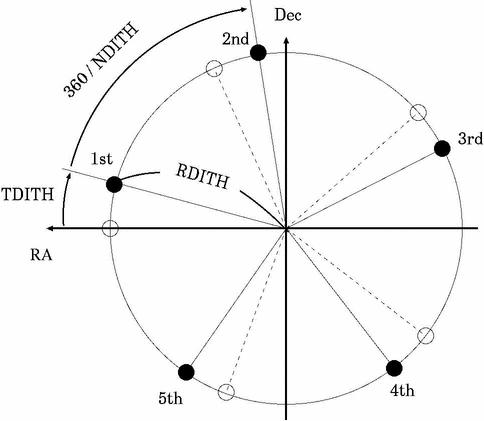
  SetupField $DEF_IMAGEN $SXDF NDITH=7 RDITH=60 TDITH=15 OFFSET_RA=0 OFFSET_DEC=0 FILTER="W-C-RC"
  GetObject $DEF_IMAGEN $SXDF NDITH=7 RDITH=60 TDITH=15 EXPTIME=480 OFFSET_RA=0 OFFSET_DEC=0 FILTER="W-C-RC"

2. With AutoGuiding
  SetupField $DEF_IMAGEN_VGW $SXDF NDITH=7 RDITH=60 TDITH=15 OFFSET_RA=0 OFFSET_DEC=0 FILTER="W-C-RC"
  GetObject $DEF_IMAGEN_VGW $SXDF NDITH=7 RDITH=60 TDITH=15 EXPTIME=480 OFFSET_RA=0 OFFSET_DEC=0 FILTER="W-C-RC"


Description:
  These 2 commands are used to take N shots (N is provided by user) at a specified field with a
  N-point circular dithering pattern.

  - SetupField moves the telescope pointing to the 1st coordinates
    with a specified Insrot_PA.
    OFFSET_RA (arcsec) and OFFSET_Dec (arcsec) are added to the RA and
    Dec of the target, then the telescope will be pointed to the
    calculated coordinates.
  - GetObject command, first, makes one exposure with EXPTIME (sec) at
    the postion where the telescope is pointing.
    After the 1st shot, GetObject will calculate the coordinates for the
    next shot based on NDITH, RDITH and TDITH, and moves the telescope to
    the calculated position.  Then, GetObject makes another exposure.
    GetObject repeats this process until the N-th is completed.

    Dithering pattern of the N-shot mode is calculated as follows
    (relative to the center coordinates (0,0)).

              RA,                             DEC
    1st pos:  RDITH*cos(0*360.0/NDITH+TDITH), RDITH*sin(0*360.0/NDITH+TDITH)
    2nd pos:  RDITH*cos(1*360.0/NDITH+TDITH), RDITH*sin(1*360.0/NDITH+TDITH)
    3rd pos:  RDITH*cos(2*360.0/NDITH+TDITH), RDITH*sin(2*360.0/NDITH+TDITH)
      ...
   n-th pos:  RDITH*cos((n-1)*360.0/NDITH+TDITH), RDITH*sin((n-1)*360.0/NDITH+TDITH)
The figure above shows a dithering pattern on the sky for NDITH=5. Exposures will be performed at each position of filled circles.
  - If you need to start the exposures from the i-th position (not
    from the 1st position), please set the SKIP parameter in both of
    SetupField and GetObject.

    From 1st shot : SKIP=0
    From 2nd shot : SKIP=1
     ...
    From i-th shot : SKIP=i-1

  - If you need to stop the exposures by the j-th position, please set the STOP
    parameter in both of SetupField and GetObject.
    End at 1st shot : STOP=1
    End at 2nd shot : STOP=2
     ...
    End at j-th shot : STOP=j

    Ex. SKIP=1 STOP=4 will take the 2nd, 3rd, and 4th shots of the NDITH-point dithering.

  Notes:
  *  Both of SetupField and GetObject must have the same SKIP and STOP parameters.
  *  NDITH, RDITH, TDITH, OFFSET_RA, OFFSET_DEC parameters must be same
     both in SetupField and GetObject.
  Otherwise, the dithering motion would be made in an unexpected manner.


Parameters and default values:

 * SetupField
  FILTER=NOP      : You must specify one filter code name.
  NDITH=3         : Number of shots in the dithering set
  RDITH=60        : Radius of the circular dithering pattern
  TDITH=0         : Offset angle of the starting position (deg)
  OFFSET_DEC=0    : Offset to be added to Dec of the target (arcsec)
  OFFSET_RA=0     : Offset to be added to RA of the target (arcsec)
  SKIP=0          : Start from the (SKIP+1)-th position
  STOP=NOP        : Stop after the (STOP)-th position is done

 * GetObject
  EXPTIME=10      : (sec) Exposure time
  FILTER=NOP      : You must specify one filter code name.
  NDITH=3         : Number of shots in the dithering set
  RDITH=60        : Radius of the circular dithering pattern
  TDITH=0         :
  OFFSET_DEC=0    : (arcsec) Offset to be added to Dec of the target
  OFFSET_RA=0     : (arcsec) Offset to be added to RA of the target
  SKIP=0          : Start from the (SKIP+1)-th position
  STOP=NOP        : Stop at the (STOP)-th position is done
Example:
  FocusOBE $DEF_IMAGE $SXDF EXPTIME=10 Z=7.70 DELTAZ=0.05 DELTA_DEC=5 FILTER="W-C-RC"


Description:
  This command performs multiple exposures for focusing with the instrument.

 - If the target field is specified, this command moves the
   telescope pointing to the provided coordinates, then performs focusing exposures.
 - performs 7 multiple exposures with EXPTIME (sec) each by changing the Z-axis position of the
   prime focus unit (FocusZ) and by offsetting the telescope pointing by every shot.
   The offset width between consecutive 2 exposures is specified by DELTA_DEC (arcsec).
 - The central position of FocusZ (4-th of the 7 exposures) is
   specified by Z (mm). Recently, Z=7.6 - 7.7 would be optimum.

 - If you set "RA=!STATS.RA DEC=!STATS.DEC" parameters instead of a paticular target field,
   you can perform the focusing at which the telescope is pointing now.


Parameters and default values:
  EXPTIME=10      : Exposure time (sec) for each exposure
  FILTER=NOP      : You must specify a filter code name.
  RA, DEC, Insrot_PA : Current values
  Z=Present Value : Central value of FocusZ (mm)
  DELTA_Z=0.05    : Difference of FocuZ between two consecutive exposures (mm)
  DELTA_DEC=5     : Offset width between two consecutive exposures (arcsec)

Notes:
Example:
  FilterChange $DEF_SPCAM FILTER="W-C-RC"


Description:
  This command moves the telescope to 45 deg if EL is below 45 deg
  when the command is invoked, and then changes filter to the
  specified one.
  FilterChange command takes approximately 5 min to complete.

Parameters and default values:
  FILTER=NOP (NOP will result in error. You must specify a code name of the filter to be set)

 code names (aliases) for general filters which are open to the general use:
  B (Johnson)  W-J-B
  V (Johnson)  W-J-V
  Rc(Cousins)  W-C-RC
  Ic(Cousins)  W-C-IC
  g'(SDSS)     W-S-G+
  r'(SDSS)     W-S-R+
  i'(SDSS)     W-S-I+
  z'(SDSS)     W-S-Z+
  NB711        N-B-L711
  NB816        N-B-L816
  NB921        N-B-L921
  V+R(*)       W-J-VR

  (*) V+R is not a general filter but will be opened to general use shortly.
  For the other (non general or custom-made) filters, please contact
  SA.


Notes:
 As of Jan/2006, this command does the following things.
 1. Stop Auto Guiding
 2. if EL<45
      EL => 45 (Pointing)
      FilterChanging
    else
      FilterChanging
The following expressions are not allowed or should be avoided in ope file.